

Serenade Support Page
Start with the videos below to get up and running, then search the FAQs with the search bar for anything specific. Still can't find what you need? Reach out and we'll help.
Watch & learn
Quick guides to get the most from your Serenade.


Support questions, answered.
The most common things customers ask us.
How can I track my order?
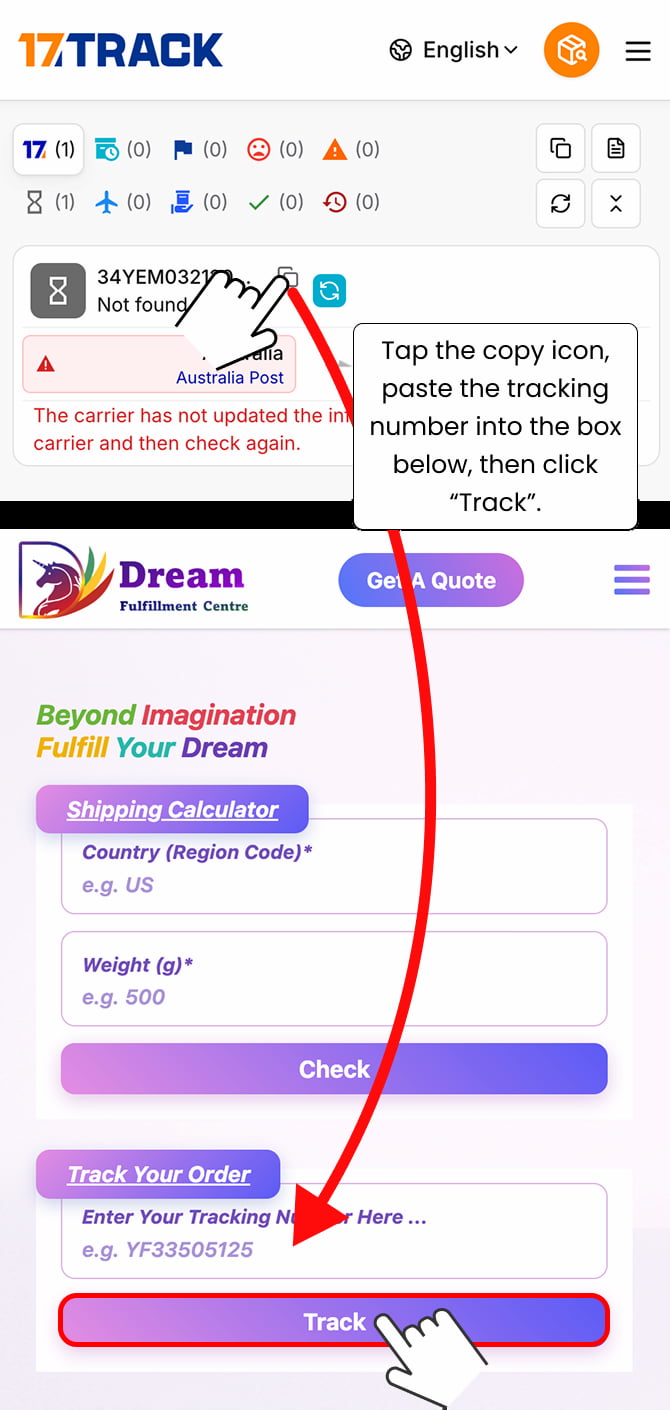
Check your inbox — and your spam and promotions folders — for an email from us letting you know your order has shipped. That email contains a tracking link showing where your package is. If the link doesn't work please copy and paste the tracking number into this tracker (as explained in the image below):
How to maximise comfort with the Serenade? (including side sleeping)
A lot of it comes down to your pillow. Because the Serenade is over-ear, you want a soft, low-loft pillow that lets the ear cup sink in rather than pressing it against your head — so skip memory foam, which is firmer and pushes the cup into your ear instead of giving way. The right pillow works for both sleeping positions:
- On your side — the ear cup sinks into the soft polyester filling, which conforms around the Serenade and makes it more comfortable.
- On your back — a low-loft pillow only lifts your head slightly, without interfering with or adding to the Serenade's built-in neck support.
Our pick is soft, low-profile and cheap — IKEA's SANDGRÄSMAL (or its sibling SKÖLDBLAD):
USA
- Preferred: IKEA US: SANDGRÄSMAL — around $3.50
- Alternative (untested): Amazon US - Acteb Ultra Thin Flat pillow — $18.39 for a 2-pack (~$9.20 each).
Australia
SKÖLDBLAD (Australia) — around AU$4.50
Europe & UK
- Search "SANDGRÄSMAL" or "SKÖLDBLAD" on your local IKEA site (around €2–€4). Both work — what matters is the density (see below).
No IKEA nearby? Any soft, lightly-filled, low-profile pillow works — that's the key, not the brand.
Want to check a pillow yourself? It's about fill density — how lightly it's packed. On the IKEA spec page you'll see two weights; use the filling weight, not the total weight (which includes the cover). Divide the filling weight by the area (length × width):
- Metric — SKÖLDBLAD: 350 g filling ÷ (50 × 60 cm) ≈ 0.12 g/cm²
- Metric — SANDGRÄSMAL: 505 g filling ÷ (65 × 65 cm) ≈ 0.12 g/cm²
- US units — SANDGRÄSMAL: 14 oz filling ÷ (20 × 26 in) ≈ 0.027 oz/in²
Don't sweat the exact figure — anywhere from about 0.10 to 0.13 g/cm² (roughly 0.023–0.030 oz/in²) is in the sweet spot. Aim for anything soft and low-profile in that range.
What else can I use the Serenade for, besides sleeping at night?
Quite a lot — it’s easy to think of it as only a night-time sleep device, but it shines anywhere you want comfort, quiet and good audio lying down:
- Meditation and breathwork — the silence plus your own audio makes it easy to drop in (a personal favourite of ours).
- Naps — at home, at a desk, or on the move.
- Travel — it replaces both your headphones and a neck pillow in one.
- Watching a film or listening on your side — no earbud digging into your ear.
- ASMR — the full seal and audio quality really come through.
- Tinnitus — many people find a steady layer of white or pink noise makes the ringing far less noticeable.
Where are the controls located?
All the controls and ports are on the right side of the Serenade: the Bluetooth/Power button (with its indicator light), the ANC/Multifunction button (with its indicator light), the USB-C charging port, the light sensor, the 3.5mm audio port, and the touch sensor.

I hear a high-pitched noise when I cover the right side with my hand to activate Transparency Mode — is that normal?
Some Serenade units make a high-pitched ringing when Transparency mode is triggered by covering the ear cup with your hand. A free firmware update disables that trigger and stops the sound — it takes about 5 minutes. Before you start, make sure your Serenade is charged and keep it next to your phone throughout.
Step 1 — Download the firmware file
Download the firmware file to your phone. It will appear in your recent downloads.
Step 2 — Install the GAIA app
iPhone: download iFi GAIA from the App Store.
Android: GAIA isn't on the Play Store, so install it directly: download the GAIA app, tap "Download anyway" if your browser warns you (that's standard for apps outside the Play Store), open the downloaded .apk file, allow installs from this source if prompted, then tap Install.
Step 3 — Update your Serenade
Open GAIA and follow our 43-second walkthrough video. Keep the app open and your Serenade on until the update finishes.
Step 4 — Test it
Turn Transparency mode on and repeat what used to cause the ringing. The hand-cover trigger no longer works after the update — Transparency mode still works from the normal controls. If you still hear ringing, contact us and tell us what happened.
How do I turn the Serenade on and off?
Press and hold the Bluetooth/Power button for about 3 seconds to turn it on (it enters pairing mode and the light blinks blue). Hold the same button for 3 seconds again to turn it off (the light turns red, then off).


How do I connect the Serenade to my phone?
Charge it first. Press and hold the Bluetooth/Power button for 3 seconds to turn it on and enter pairing mode, then choose ‘Blisstil Serenade’ in your device’s Bluetooth menu. The indicator blinks blue once connected.

How do I check the battery level?
Your phone shows it. On iPhone, add the Batteries widget to your Home Screen; on Android it appears in your Bluetooth settings.

How long does the battery last, and how do I charge it?
Plug the USB-C cable into the port inside the right ear cup. A full charge takes about 2 hours and gives 20+ hours of playback; a 15-minute top-up gives around 2.5 hours. The power light is red while charging and blue when full.

My Serenade shows it has charged, but it won’t turn on when unplugged — what should I do?
If your Serenade appears to charge, but then won’t turn on once the charging cable is removed, the first thing to try is charging it again using a different USB-C cable and a different wall plug.
This can happen if the battery did not receive enough consistent power during charging — for example, if several devices were sharing the same wall plug, or if the cable was faulty. Switching to a fresh cable and plug, with nothing else connected, can give the Serenade the full charge it needs.
For best results:
- Use a wall plug rather than a laptop, power bank, or shared USB hub.
- Use a different USB-C cable if you have one available.
- Charge the Serenade on its own, with no other devices sharing the same plug or power adapter.
- Leave it charging for a few hours, then unplug it and try turning it on again.
If the Serenade still won’t turn on after trying a different cable and wall plug, please contact us and we’ll help you from there.
How should I wear the Serenade?
Wear it around your neck like a travel pillow with the opening facing away from you, then lift it over your head so it sits snugly against your head and neck. Always grip the internal structure — never pull on the foam alone. Long hair? Tie it in a bun. For the most stability, wear the eye mask over the Serenade, not underneath.


How do I tighten or loosen the fit?
To tighten: place your palms on the base near the zipper (you’ll feel the wires inside) and squeeze inward, folding the side pillows in toward the neckband one at a time. To loosen: grab both sides and gently pull outward. Adjust until it feels secure and comfortable.


I think I received the wrong size. How can I check?
To troubleshoot sizing issues please click on the button below and follow the steps in the survey.
The fabric cover won't come off — is it stuck?
It shouldn't be — the cover is fully removable and isn't glued in place. First, have you watched our video on how to remove the fabric cover (Remove. Wash. Refit.)? Most of the time it just needs to come off the right way, and the video walks you through it step by step. If you've followed that and it still won't budge, the edge of the cover has probably been trapped under the ear pad during assembly. As a last resort, unclip and remove the ear pad first, free the cover, then clip the ear pad back in — the second video below (Align. Press. Click.) shows how to refit the ear pad. Take your time clipping it back, as it can be a little fiddly. If it still won't come free, get in touch via the form below.


How do I block out the most noise?
For very noisy environments, combine earplugs + the Serenade + brown noise, and make sure you have a snug fit with a full ear seal.

How do I remove the “new product” smell from the headphones?
Some units may have a stronger “new product” smell when first opened, especially after being sealed inside the travel case during shipping.
The best way to remove it is to take the Serenade out of the travel case and leave it in a well-ventilated room for a few days. The smell should gradually dissipate on its own.
You can also leave the travel case open separately so both the headphones and the case can air out properly.
Please do not wash the headphones or use cleaning sprays, perfumes, or strong chemicals on the fabric or electronics.
Will my alarm ring through the Serenade?
Yes — set your phone alarm as usual and it plays through the Serenade. Calls and notifications also come through unless your phone is in sleep / Do Not Disturb mode, so enable that before bed and always test your setup first.

Can I take phone calls with it?
Not really — the microphones are there for noise cancelling, not calls, so you can’t answer a call or be heard through the Serenade. You’d speak through your phone as usual.
It will, however, announce an incoming call. As long as you’re not in Do Not Disturb or Sleep mode, a connected phone (an iPhone, for example) will say “Call from [name]” in your ear — so if there’s an emergency, you’ll hear it and won’t miss it. You just can’t take the call through the headphones themselves.
How do I wash the cover and clean the Serenade?
Unzip and remove the fabric cover and machine wash it on a delicate cold cycle (20°C / 68°F or below) with mild detergent. Wipe the foam and ear pads with a damp cloth and mild detergent — never let water into the ear cup, as it will damage the electronics. Air dry everything fully before refitting. Don’t tumble dry, iron, dry clean or blow-dry.

What sleeping positions does it work in?
Side and back. Stomach sleeping doesn’t really work — you’d have to prop your torso up so your head isn’t higher than your body, which isn’t comfortable. If you sleep on your front most of the night, the Serenade probably isn’t the right fit for you.
Should I play sound, or just wear it like earmuffs?
Play something — don’t wear the Serenade silently like a pair of earmuffs.
The Serenade works best with a quiet layer of audio under the noise cancelling.
The cushions and ANC reduce a lot of outside noise, but soft white, pink, or brown noise — or gentle music — helps mask whatever still gets through.
When you’re in a very quiet environment, your hearing naturally becomes more sensitive to small noises — think of a silent cave, where every little sound suddenly feels louder. A soft background sound raises the listening floor, so those smaller sounds become much less noticeable.
Earplugs can feel different because they fully block the ear canal, which often makes internal sounds — like breathing, heartbeat, or movement — more noticeable. The Serenade works differently: it surrounds your ears without plugging them, so adding a quiet masking sound helps create that same sense of acoustic coverage without the plugged-ear feeling.
For extreme noise situations — like very loud snoring, loud neighbours, or heavy traffic — the strongest setup is to layer multiple forms of protection: soft earplugs, the Serenade’s cushions, ANC, and low-volume brown noise. Most people won’t need all of this, but if you’re dealing with a seriously noisy environment, layering will always give you the best result.
See our app suggestions below for what to play it with.
What pillow should I use with the Serenade?
Yes, use a pillow — just not foam, memory foam or ergonomic ones, as they fight the Serenade’s neck support and side cushions and end up uncomfortable. A soft, inexpensive polyester-filled pillow works best: it compresses easily and moulds around the headphones. Height is personal — use a fuller pillow (or stack two thin ones) if you like your head raised, a flatter one if you don’t, and some people find no pillow at all suits them. After testing a pile of options, the cheap polyester pillow from IKEA was our favourite.
Is there a Blisstil app? What do you recommend playing?
There’s no Blisstil app — we put our energy into the hardware and let you use whatever you already like. A few we’d recommend:
- Noisli or myNoise — mixable ambient sound with volume control per sound; both have a free tier.
- White Noise Lite (iOS & Android) — simple, free white, pink and brown noise that runs all night.
- Calm or Headspace — sleep stories and guided meditations.
- Spotify or Apple Music — your own music or podcasts, each with a built-in sleep timer.
Can I play rain, ocean or other ambient sounds through my Serenade for free?
Yes! If you have an iPhone, you don't need a separate app — Apple has a built-in feature called Background Sounds, with rain, ocean, stream, fire, night and more, and it plays beautifully through your Serenade.
To turn it on, open Settings and search "Background Sounds" (or go to Settings → Accessibility → Audio & Visual → Background Sounds). Switch it on, tap Sound to pick the one you like, and set the volume.
There are a few lovely extras on the same screen:
- Use When Media Is Playing layers the ambient sound gently underneath your own music or podcasts, so you can have rain behind your playlist.
- Stop Sounds with a Timer acts as a sleep timer, fading the sound out after you've drifted off.
- Play Sample lets you preview each sound before you commit.
Tip: you can also add Background Sounds to your iPhone's Control Centre for one-tap access from anywhere.

How do I connect the Serenade?
Answer goes here.
Does it pause or switch off when I fall asleep?
There’s no sleep detection, so it won’t shut itself off as you drift away. Two things help: set a sleep timer in your audio app (Spotify, Apple Music, Calm and others have one) so playback fades out after a set time, and the built-in light sensor automatically pauses your audio the moment you take the Serenade off.
Can I use it without my phone?
To play audio, no — the Serenade needs to be connected to a device (phone, tablet or computer), as it has no built-in memory to store music or sounds of its own. The noise cancelling, though, works on its own with nothing connected, so you can wear it purely to block out sound.
How do I disable or re-enable Bluetooth?
To disable Bluetooth while connected, triple-click the Bluetooth/Power button — the Serenade disconnects from your device and stops being discoverable to new ones. To re-enable it, triple-click the Bluetooth/Power button again and it reconnects to your last device.


How do I turn ANC (noise cancelling) on or off?
ANC runs automatically while you’re wearing the headphones. To turn it off, cover the light sensor until the ANC light turns green, then double-click the ANC/Multifunction button. Double-click it again to turn ANC back on. To check whether it’s on, cover the light sensor — a green light means ANC is active.


How do the touch controls work?
All on the right ear cup: slide up or down to change volume, slide toward your face for the next track and toward your neck for the previous one, double-tap to play or pause, and rest your whole hand over the sensor for Transparency mode (remove it to switch back).

How do I turn the touch controls on or off?
Good news: this is usually an easy fix, and neither solution affects how your Serenade works otherwise. There are two likely causes — try the first, and if the music still stops during the night, move on to the second. If it persists, do both at the same time.
1. The touch controls are being triggered accidentally. The touch surface on the right ear cup can sometimes register a command from the static of your pillowcase (silk, polyester and nylon carry much more static than cotton) or from your arm resting too close to the headphones — either can pause your audio. To rule this out, turn the touch controls off: cover the light sensor, then triple-click the ANC/Multifunction button. There's no light or sound to confirm the change — to check it worked, wear the Serenade or cover the light sensor with your finger, play some audio and try a touch gesture: if nothing happens, the touch controls are off. The same action turns them back on whenever you want them.
One thing to know: they switch back on automatically whenever the Serenade is powered off and on, so you'll need to turn them off again after each restart.
2. The wear sensor is misreading long stillness. Inside the right ear cup is a small light sensor that detects whether the Serenade is being worn. On some units, staying very still for a long period can make the sensor decide the Serenade has been taken off, so it automatically pauses the audio and then switches off. To prevent this, cover the light sensor with a small piece of opaque tape — electrical tape or painter's tape works well. This disables only the automatic pause/off function; audio, ANC, battery performance and the controls all keep working normally. You can still switch the Serenade off manually by long-pressing the Bluetooth/Power button.
The light sensor is inside the right ear cup, just below the "R", on the same side as the USB-C charging port — shown in the diagram below.

The Serenade won’t show up in my Bluetooth menu
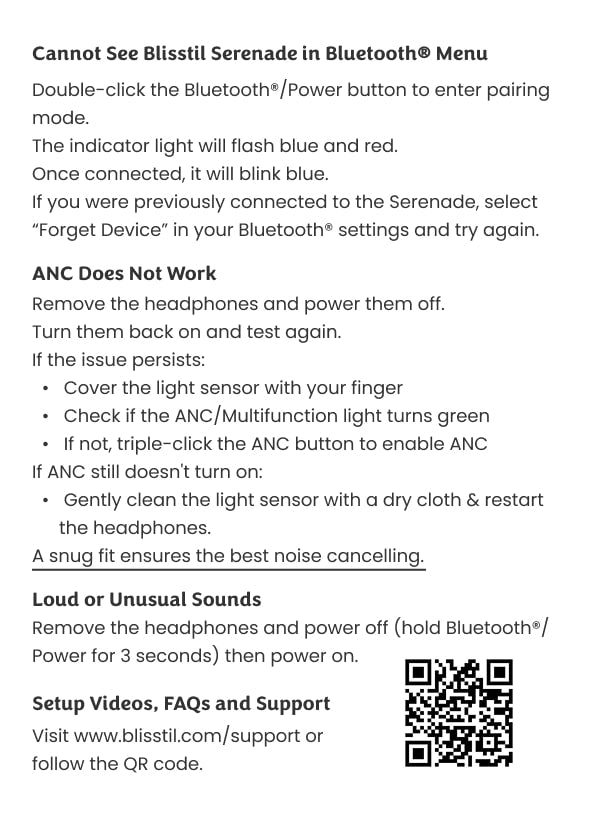
Double-click the Bluetooth/Power button to force pairing mode — the light flashes blue and red, then blinks blue once connected. If you’ve paired before, choose ‘Forget device’ in your Bluetooth settings and try again.
ANC doesn’t seem to be working
Power it off and on again. If it persists, cover the light sensor and check the ANC light turns green; if it doesn’t, triple-click the ANC button to enable it. Still nothing? Gently wipe the light sensor with a dry cloth and restart. A snug fit gives the best noise cancelling.
Why does the music stop or the Serenade switch off during the night — and how do I fix it?
Good news: this is usually an easy fix, and neither solution affects how your Serenade works otherwise. There are two likely causes — try the first, and if the music still stops during the night, move on to the second. If it persists, do both at the same time.
1. The touch controls are being triggered accidentally. The touch surface on the right ear cup can sometimes register a command from the static of your pillowcase (silk, polyester and nylon carry much more static than cotton) or from your arm resting too close to the headphones — either can pause your audio. To rule this out, turn the touch controls off: cover the light sensor, then triple-click the ANC/Multifunction button. The same action turns them back on whenever you want them. One thing to know: the touch controls switch back on whenever the Serenade is powered off, so you'll need to turn them off again each time you restart it.
2. The wear sensor is misreading long stillness. Inside the right ear cup is a small light sensor that detects whether the Serenade is being worn. On some units, staying very still for a long period can make the sensor decide the Serenade has been taken off, so it automatically pauses the audio and then switches off. To prevent this, cover the light sensor with a small piece of opaque tape — electrical tape or painter's tape works well. This disables only the automatic pause/off function; audio, ANC, battery performance and the controls all keep working normally. You can still switch the Serenade off manually by long-pressing the Bluetooth/Power button.
The light sensor is inside the right ear cup, just below the "R", on the same side as the USB-C charging port — shown in the diagram below.

How do I connect the Serenade?
Answer goes here.
What is Auracast and how do I use it?
Press and hold the ANC/Multifunction button for 3 seconds to enter or exit Auracast mode. In Auracast the blue light triple-blinks and the Serenade can join an Auracast broadcast; when you exit, it reconnects to your last device.

What’s the Bluetooth range?
About 10 metres (33 feet) — enough to leave the room and come back. Walls, doors, furniture and other wireless gear can shorten it, so keep your device reasonably close for the steadiest connection.
Does it block every single sound?
No — but it blocks far more than a typical sleep headphone. Oversized cushions handle passive blocking, active noise cancelling tackles low rumbles like engines and traffic, and because it covers the bone behind your ear it cuts sound that earbuds and on-ear headphones can’t. The last sliver is best handled by playing low white noise or music. In very loud places you can even wear earplugs underneath and still get the benefit of ANC and audio on top.
Are the speakers stereo or mono?
Stereo, driven by 40mm drivers — so you get full, immersive sound rather than a flat single channel.
Is the Serenade under warranty?
Yes — the Serenade carries a 2-year warranty from delivery against defects in materials, electronics and workmanship under normal use, and we’ll repair or replace a defective unit. It doesn’t cover normal wear and tear, cosmetic or accidental damage, misuse or unauthorized repairs. Fabric covers and ear pads are wear items and aren’t covered — replacements are available separately. Full details are on our warranty policy.
My order arrived damaged or faulty — what do I do?
Get in touch via the form below with your order number and photos of both the product and the shipping box, and return it with all accessories and packaging. If we confirm a manufacturing defect or shipping damage, we’ll repair, replace, or refund you including the original shipping.
No results — try another word, or contact us.
Orders & shipping
Tracking, delivery times and order changes.
Warranty
Your 2-year coverage, explained.
Sizing & fit
Measure your neck and pick the right size.
Still need a hand?
Send us a note and a real person on the Blisstil team will get back to you, usually within 3 business days.